


What Is Fireflies AI, and Why Use It?
At its simplest, Fireflies AI is an automated notetaker. Once activated, it joins your video calls—Zoom, Google Meet, Microsoft Teams, and more—records both audio and video, then transforms the dialogue into searchable, timestamped transcripts. Beyond plain transcription, Fireflies AI sprinkles in conversation intelligence, spotting key topics, measuring speaker engagement, and even detecting sentiment. Whether you’re running a project kickoff, a sales pitch, or a casual family Zoom gathering, Fireflies AI promises a painless way to archive and revisit every important insight.
Core Features That Set It Apart
1. Automated Transcription & Summaries
With one click, Fireflies AI captures your meeting and delivers a full transcript soon after. From there, you can generate concise summaries highlighting action items, decisions, and crucial discussion points—perfect for sharing with colleagues who couldn’t attend.
2. Conversation Intelligence
Beyond words on a page, Fireflies AI analyzes your meeting dynamics:
- Topic Tracking: See how often “budget,” “timeline,” or any custom keyword surfaces.
- Speaker Analytics: Identify who spoke the most, who asked the most questions, and even the length of each monologue.
- Sentiment Detection: Gauge whether the team’s tone was positive, neutral, or negative around a given subject.

These insights can help managers understand participation patterns and ensure no voice goes unheard.
3. Fireflies Apps & AI Assistants
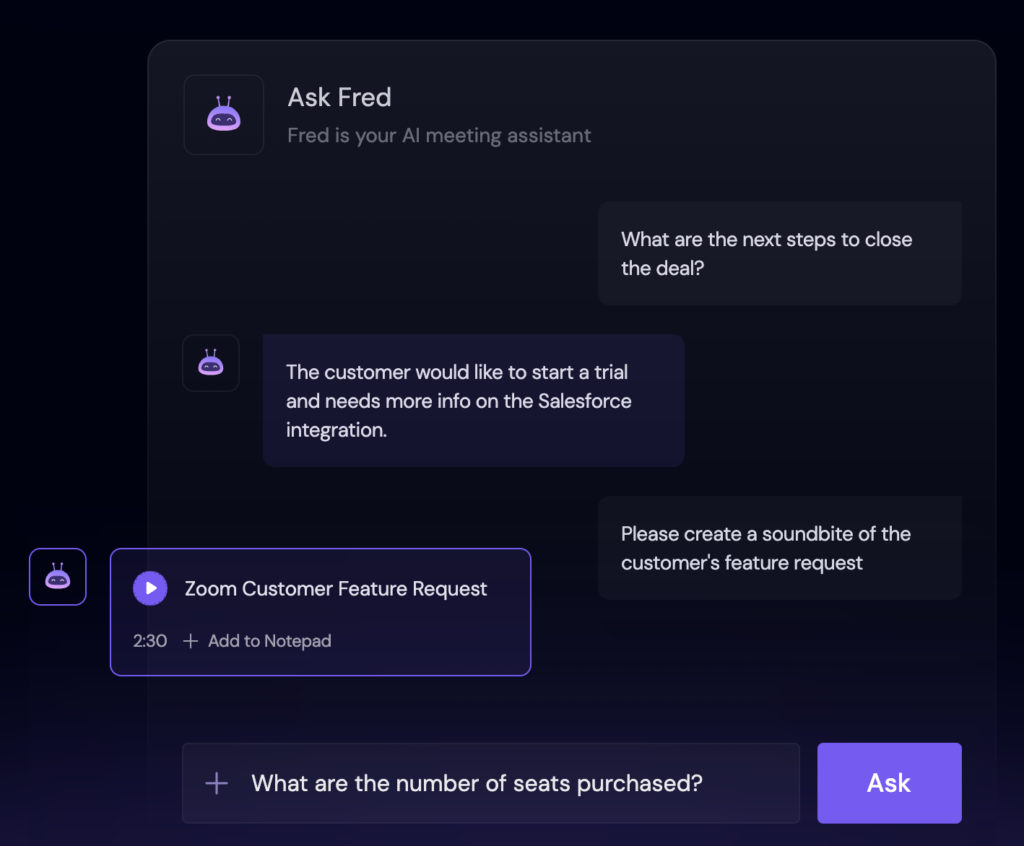
Fireflies AI comes with a mini “app store” of productivity boosters. For instance, AskFred can answer questions about your meeting on demand, or automatically draft follow‑up emails, blog posts, and reports based on your transcript. Other modules let you extract quotes, pull soundbites, or translate transcripts into over 60 languages—streamlining workflows across global teams.
4. Chrome Extension & Integrations
With its Chrome add‑on, Fireflies AI slips into your browser seamlessly. As you join a Google Meet, it quietly starts transcribing; when the meeting ends, you get an email alert that your notes are ready. Meanwhile, native integrations with Slack, Notion, Asana, Salesforce, and dozens more mean your summaries and transcripts can auto‑populate the tools you already use every day.
5. Developer-Friendly API
For companies with custom conferencing setups, Fireflies AI’s API allows you to upload recorded audio, pull past transcripts, delete outdated data, and even assign user roles programmatically. It’s a flexible foundation for embedding transcription and analytics into your own applications.
Plans & Pricing at a Glance
Fireflies AI offers four tiers—from a Free Forever plan to an Enterprise package:
- Free: 800 minutes of storage per seat and limited AI summaries.
- Pro ($18/seat/month): 8,000 minutes of storage, unlimited summaries.
- Business ($29/seat/month): Unlimited storage and enhanced AI apps.
- Enterprise ($39/seat/month): Advanced security, onboarding, and priority support.
All plans include unlimited transcriptions, support for major conferencing platforms, global search, and collaborative sharing. Annual billing comes with a 40% discount—but even on a month‑to‑month basis, the flexibility to scale seats up or down is invaluable for growing teams.

Where Fireflies AI Shines—and Where It Stumbles
Pros:
- Hands‑Free Notetaking: Focus on the conversation, not your keyboard.
- Rich Analytics: Go beyond transcripts to understand meeting dynamics.
- Deep Integrations: Seamlessly feed notes into your project management and CRM.
- Generous Free Plan: Great for occasional users or small teams testing the waters.
- Responsive Support & Resources: A robust knowledge base and well‑rated customer service.
Cons:
- Cost Can Add Up: Larger teams or heavy users will want higher‑tier plans.
- Feature Overlap: Some users may find that basic transcript tools—or lower‑cost competitors—cover their needs without the advanced analytics.
- Learning Curve: To unlock the full power of conversation intelligence and apps, teams must invest time in setup and training.

Alternatives Worth Considering
If Fireflies AI isn’t an exact match, three other tools stand out:
- Otter AI: A long‑standing player offering real‑time transcription, collaboration features, and integrations at a competitive price.
- Fathom: Free for individuals, with highlights and summaries—and an affordable team edition for shared meeting archives.
- Notta: Budget‑friendly plans with multilingual transcription and action‑item extraction, ideal for global companies.
Evaluate your priorities—whether that’s detailed analytics, budget constraints, or advanced AI assistants—and take advantage of free trials to see which solution fits your workflow best.

Is Fireflies AI Right for You?
Fireflies AI is a powerhouse for teams that rely on frequent meetings and crave deeper insights from every conversation. Its blend of transcription, conversation intelligence, and AI‑driven apps can transform how you capture and act on meeting information. For companies ready to invest in a smarter, data‑driven approach to meetings—and willing to onboard their teams—the payoff can be substantial.
On the other hand, if your needs are limited to basic transcription and occasional summaries, lighter (and cheaper) tools may suffice. Whichever path you choose, giving your notetaker a digital upgrade will free up your attention, boost collaboration, and ensure no critical detail slips through the cracks.


